Choosing the right depth for your study desk is crucial for comfort, focus, and long-term health. This guide breaks down the optimal measurements, ergonomic principles, and practical tips to help you create a workspace that supports productivity without sacrificing space or style.
Key Takeaways
- Standard desk depth ranges from 24 to 30 inches: This provides enough room for a laptop, notebook, and other essentials without forcing you to lean forward.
- 28 inches is ideal for most users: It balances workspace and reachability, especially for those using dual monitors or writing frequently.
- Shallow desks (under 24″) suit compact spaces: Great for small rooms or minimalist setups, but may limit functionality.
- Ergonomics matter more than size alone: Your chair height, monitor distance, and arm position should align with desk depth for proper posture.
- Adjustable or modular desks offer flexibility: Consider desks with extendable surfaces or add-on trays if your needs change over time.
- Measure your gear before buying: Ensure your laptop, keyboard, mouse, and reference materials fit comfortably within the desk’s depth.
- Personal preference plays a role: Some users prefer more space for spreading out, while others like a compact, focused setup.
How Deep Should a Study Desk Be for Comfort and Productivity
When setting up a study space, one of the most overlooked yet essential factors is the depth of your desk. While height and width often get more attention, desk depth directly affects your posture, workflow, and overall comfort during long study or work sessions. A desk that’s too shallow can feel cramped and force you to hunch forward, while one that’s too deep may require you to stretch or lean in, leading to fatigue and poor ergonomics.
So, how deep should a study desk be? The short answer: between 24 and 30 inches, with 28 inches being the sweet spot for most people. But the right depth depends on your body size, the equipment you use, and how you like to work. In this guide, we’ll walk you through everything you need to know to choose the perfect desk depth for your needs—whether you’re a student, remote worker, or lifelong learner.
By the end of this article, you’ll understand the science behind desk depth, how to measure your space and gear, and how to optimize your setup for maximum comfort and productivity. Let’s dive in.
Why Desk Depth Matters for Studying

Visual guide about How Deep Should a Study Desk Be for Comfort and Productivity
Image source: athletedesk.com
Before we get into measurements, it’s important to understand why desk depth is such a big deal. Your desk isn’t just a surface—it’s the foundation of your entire workspace. If it’s not the right depth, you might experience:
- Neck and shoulder strain: Leaning forward to reach your keyboard or screen can cause tension over time.
- Poor posture: Slouching or hunching reduces circulation and increases fatigue.
- Reduced focus: Constant physical discomfort makes it harder to concentrate.
- Clutter and disorganization: A desk that’s too small forces you to stack items, while one that’s too large encourages unnecessary distractions.
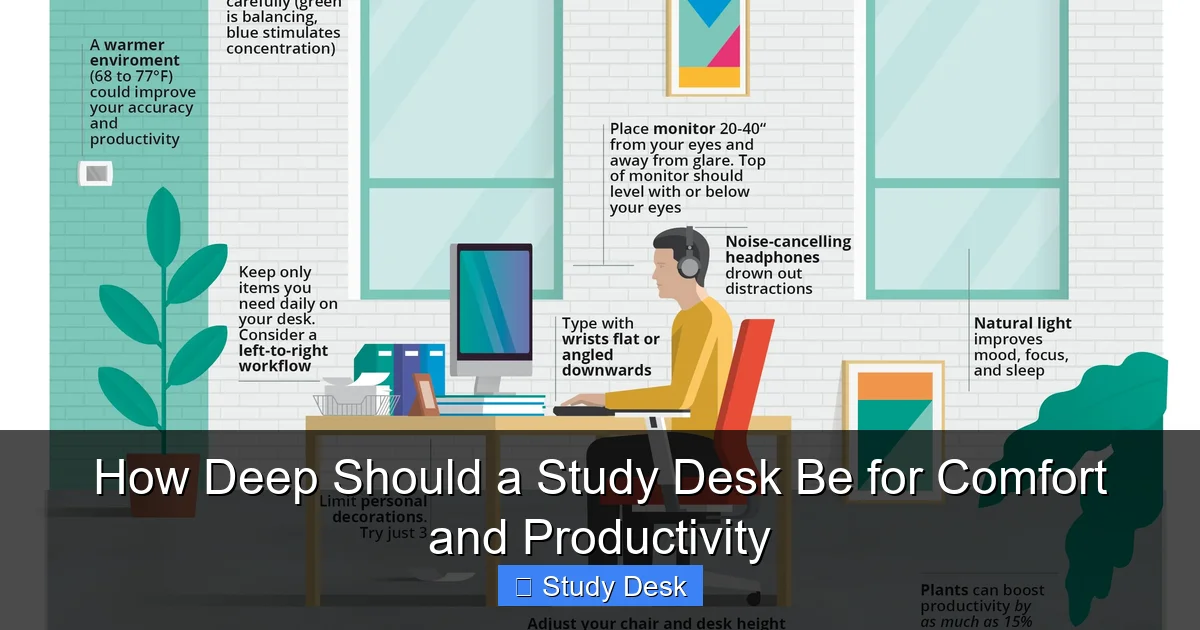
A properly sized desk supports a neutral body position: your feet flat on the floor, knees at 90 degrees, elbows close to your body, and eyes level with the top third of your screen. This alignment reduces strain and helps you stay focused for longer.
Think of your desk depth like the foundation of a house—if it’s off, everything else built on top will be unstable. Getting it right means you can work comfortably for hours without aches or distractions.
Standard Desk Depth Guidelines
Visual guide about How Deep Should a Study Desk Be for Comfort and Productivity
Image source: images.zapier.com
Most study desks on the market fall within a standard depth range of 24 to 30 inches (61 to 76 cm). Here’s a breakdown of what each range is best suited for:
24 to 26 Inches: Compact and Space-Saving
These desks are ideal for small rooms, dorms, or minimalist setups. They work well if you primarily use a laptop and don’t need much extra space. However, they can feel cramped if you use a full-sized keyboard, mouse, or multiple notebooks.
Best for: Students in tight spaces, casual users, or those who prefer a clean, uncluttered look.
27 to 29 Inches: The Goldilocks Zone
This is the most popular and versatile range. A 28-inch deep desk offers enough room for a laptop or desktop monitor, keyboard, mouse, and a notebook—all within easy reach. It supports good posture and allows for a natural arm position while typing.
Best for: Most students, remote workers, and anyone using a standard setup with one or two screens.
30 Inches and Up: Spacious and Functional
These deeper desks are great for power users who need room for dual monitors, large textbooks, or creative tools like drawing tablets. They also allow for better cable management and storage. The downside? They take up more floor space and may require you to lean in if your chair isn’t positioned correctly.
Best for: Designers, researchers, or anyone with a complex workstation.
How to Measure Your Ideal Desk Depth
Visual guide about How Deep Should a Study Desk Be for Comfort and Productivity
Image source: yankodesign.com
Now that you know the general ranges, let’s figure out what’s right for you. Follow these steps to determine your ideal desk depth:
Step 1: Assess Your Equipment
Lay out everything you typically use while studying:
- Laptop or monitor
- Keyboard and mouse
- Notebooks, textbooks, or planners
- Pen holder, lamp, or other accessories
Measure the total depth required when these items are arranged comfortably in front of you. For example:
– A 15-inch laptop: ~10 inches deep
– Standard keyboard: ~6 inches
– Mouse: ~4 inches
– Notebook: ~1 inch
Add a few extra inches for movement and comfort. If your total is around 20–22 inches, a 24-inch desk might work. If it’s closer to 26–28 inches, aim for a 28-inch desk.
Step 2: Consider Your Arm Reach
Sit in your chair with your back against the backrest and arms relaxed at your sides. Gently bend your elbows to 90 degrees—this is your natural typing position.
Now, measure the distance from the edge of your chair to the point where your fingertips naturally rest. This is your “reach zone.” Ideally, your keyboard and mouse should sit within this zone. If your desk is too deep, you’ll have to lean forward; if it’s too shallow, your arms will be cramped.
Most people have a reach zone of 24 to 28 inches, which aligns perfectly with the standard desk depths.
Step 3: Factor in Monitor Distance
Your screen should be about an arm’s length away—roughly 20 to 30 inches from your eyes. If your desk is too shallow, your monitor might be too close, causing eye strain. If it’s too deep, you might need to lean in to read text clearly.
For a single monitor, a 28-inch desk usually provides the right distance. For dual monitors, consider a 30-inch depth or use monitor arms to save space.
Step 4: Test It Out
If possible, visit a furniture store and sit at desks of different depths. Bring your laptop or a notebook to simulate real use. Pay attention to:
– Can you type without leaning forward?
– Is your screen at eye level and the right distance?
– Do you have room to move your arms freely?
Alternatively, use painter’s tape to mark different depths on your floor and test with your current setup.
Ergonomic Tips for Desk Depth
Even with the right depth, poor ergonomics can ruin your comfort. Here’s how to optimize your setup:
Position Your Chair Correctly
Your chair should be close enough to the desk that your elbows rest comfortably at 90 degrees when typing. If your desk is deep, you may need a chair with adjustable depth or a footrest to maintain proper posture.
Use a Monitor Stand or Arm
If your desk is deep but you don’t want your screen too far away, use a monitor stand or articulating arm. This lets you adjust the screen distance and height without sacrificing desk space.
Keep Frequently Used Items Within Reach
Place your keyboard, mouse, and notebook within your natural reach zone. Store less-used items (like textbooks or chargers) on shelves or in drawers to avoid clutter.
Adjust Your Lighting
A deep desk can create shadows if your lamp is too far back. Use an adjustable desk lamp that shines light evenly across your workspace without glare.
Take Breaks and Stretch
No matter how perfect your desk is, sitting for long periods is hard on your body. Follow the 20-20-20 rule: every 20 minutes, look at something 20 feet away for 20 seconds. Stand up, stretch, and move around every hour.
Choosing the Right Desk for Your Space
Once you know your ideal depth, it’s time to pick a desk that fits your room and lifestyle. Here are some popular options:
L-Shaped Desks
These offer ample surface area and can fit into corners. Look for models with a main depth of 28 inches and a return side of 24 inches for balance.
Wall-Mounted or Floating Desks
Great for small spaces. Choose a depth of 24 to 28 inches depending on your needs. Ensure the wall can support the weight and that you have enough clearance for your chair.
Adjustable Height Desks
While not directly related to depth, standing desks often come in standard depths. Look for models with a 28-inch depth to accommodate your gear whether sitting or standing.
Modular or Extendable Desks
Some desks have pull-out trays or extendable sides. These let you customize the depth based on your task—perfect for students who switch between writing, typing, and reading.
Troubleshooting Common Desk Depth Problems
Even with the best planning, you might run into issues. Here’s how to fix them:
Problem: My desk feels too shallow.
Solution: Add a pull-out keyboard tray or a small shelf above the desk to hold your notebook or tablet. This keeps essentials within reach without needing a deeper surface.
Problem: My desk is too deep, and I have to lean forward.
Solution: Move your chair closer and use a monitor arm to bring your screen forward. Alternatively, place a small footrest under your desk to support your posture.
Problem: I can’t fit everything I need.
Solution: Use vertical storage like shelves or drawer units. Keep only daily essentials on the desk surface to reduce clutter.
Problem: My arms feel cramped while typing.
Solution: Check your chair height and desk height. Your elbows should be at 90 degrees with your wrists straight. If needed, adjust your chair or use a padded wrist rest.
Final Tips for a Productive Study Setup
Choosing the right desk depth is just the beginning. To truly boost your productivity, consider these final tips:
- Keep it clean: A clutter-free desk reduces distractions and helps you focus.
- Personalize your space: Add a plant, photo, or motivational quote to make your desk inviting.
- Use cable organizers: Tangled wires can eat up space and create visual clutter.
- Match your desk to your workflow: If you write by hand often, prioritize depth for notebooks. If you’re digital-heavy, focus on monitor placement.
- Reassess regularly: Your needs may change over time. Don’t be afraid to adjust your setup as you grow.
Conclusion
The depth of your study desk plays a quiet but powerful role in your daily comfort and productivity. While the standard range of 24 to 30 inches covers most needs, the ideal depth for you depends on your body, your gear, and how you like to work.
Aim for 28 inches if you’re unsure—it’s the most balanced option for ergonomics and functionality. Measure your equipment, test your reach, and prioritize posture over aesthetics. Remember, the best desk isn’t the biggest or most stylish—it’s the one that helps you work comfortably and stay focused.
Investing time in choosing the right desk depth is an investment in your health, focus, and long-term success. So take a moment, measure twice, and set up a space that truly supports your goals. Your future self will thank you.